New Recent Comments Hack

Recent comments can be displayed in the sidebar of your Blog using the Feed page element. As a Feed-url you can provide "http://yourblogname/feeds/comments/full" to get the last 5 comments, with author and name. That's the standard functionality, and I really didn't like it at all. The standard comments-feed has a few things missing. First of all, the first few words of the comment are displayed as a link, but clicking the link brings you to the top of the post-item page in stead of to the comment itself. That is because of a bug in the link that is provided by Blogger. Second, I want to see on what post a person has commented. The feed doesn't provide for the post title, but we could obtain it from the link - and that is where this hack kicks in.

Our objective is to create a Recent Comments widget, that displays recent comments in the following format: "On [date & year] [author] commented on [post title]: [comment-summary] (more)".

Here is how you do it.

Step 1: Make a backup of your template.

Step 2: Add a standard recent comments widget to your Blog.
From the dashboard select your Blog and click Layout. Go to the Template tab and select Page Elements. In your sidebar add a Feed page element.
Enter your comment feed url.


Tick Item dates and Item sources on.
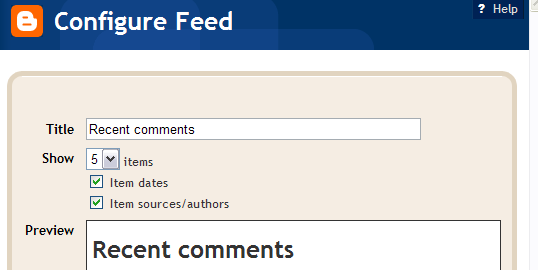


Save your template and view your Blog. You now have a standard recent comments widget.

Step 3: Add some javascript to the head of your template.
If you added my social bookmarking hack, you can skip this step.
If not, go to the Template tab, click Edit HTML, and add the following line of code to your templates head, just above the </head>-tag:
<script src='http://home.planet.nl/~hansoosting/downloads/beautifulbeta.js' type='text/javascript'/>

Save the template.

Step 4: Replace the widget coding
Go to the Template tab, and click Edit HTML. Now find your sidebar, and look for the new widget you just created. It will look something like this:

<b:widget id='Feed2' locked='false' title='Recent comments' type='Feed'/>

Now click Expand Widget Templates, and look for the widget. Use Ctrl-F to find it, using it's ID (in this example Feed2).
Replace the entire widget by the following code:

<b:widget id='Feed2' locked='false' title='Recent comments' type='Feed'>
<b:includable id='main'>
<h2><data:title/></h2>
<div class='widget-content'>
<ul expr:id='data:widget.instanceId + "_feedItemListDisplay"'>
<b:loop values='data:feedData.items' var='i'>
<li>
<b:if cond='data:showItemDate'>
<b:if cond='data:i.str_published != ""'>
<span class='item-date'>
On&#160;<data:i.str_published/>
</span>
</b:if>
</b:if>
<b:if cond='data:showItemAuthor'>
<b:if cond='data:i.author != ""'>
<span class='item-author'>
&#160;- <data:i.author/> commented on
</span>
</b:if>
</b:if>
<script type='text/javascript'>getPostTitle(&quot;<data:i.alternate.href/>&quot;)</script>&#160;:
<span class='item-title'>
<data:i.title/>&#160;<script type='text/javascript'>getCommentLink(&quot;<data:i.alternate.href/>&quot;)</script>
</span>
</li>
</b:loop>
</ul>
<b:include name='quickedit'/>
</div>
</b:includable>
</b:widget>

Save your template.

Your hack is implemented now.

Tech stuff.
I started with the standard-widget. First I canged the order of the <data>-elements to date, author, comment-summary. The comment-summary is represented by <data:i.title/>. In the standard widget, the comment summary is embedded in an anchor that links (or should link) to the comment. The consruction looks like this:

<a expr:href='data:i.alternate.href'><data:i.title/></a>

The link-address of the <data:i.alternate.href/>-field has the following format: "http://yourblog.blogspot.com/year/month/posttitle.html#number".
We will use this link to parse the posttitle from it, and to retrieve the correct comment-permalink. The correct permalink to the comment has the folowing format:
"http://yourblog.blogspot.com/year/month/posttitle.html#comment-number".

I wrote 2 js functions. The first function, getPostTitle, is handed the alternate.href, and writes the post title as a hyperlink to the post-item-page to the document. The second function, getCommentLink, is handed the alternate.href, builds the correct permalink, and displays it as a (more)-link.

This is what people say:

Keith Schooley said...

Nice idea, Hans--

But just so you know, in IE 6.0, I'm seeing the following:

Recent comments
On Nov 22, 2006 - Hans commented on : @unduvaldes: in your post you used
On Nov 22, 2006 - Hans commented on : @Keith: post a post with a list that doesn't look ...

I.e., the post title doesn't appear.

Hoctro said...

Hans, I think you have a great idea here! I always want to see the post title of the comment. Now, in lieu of the recent JSON available format and the controllable number of comments offered by Ramani, you could experiment your idea with these new developments.

I think the comments look better if they're being put in the main column, where there's more room.

Cheers,

DarkUFO said...

Very nice hack, although I'm not seeing the Post Title in FF 2.0

[La otra agenda] said...

Great hack Hans!
Thank-you very much!

Anyway I would like that the comments were a little bit smaller (font-size, I mean). Is it possible?
I'm trying to include the font-size command inside the widget but my template crash.
Any ideas??
Thanks!

Hans said...

@Keith & Dark UFO: I think that your browser doesn't allow script execution. Switch it on and you will see the post titles.

@Hoctro: I was hoping you would create a great hack using JSON....I am sooo short of time!

@Otro Agenda: the widget uses several classes (See inside the html-code). In the style-sheet (between <style> and </style>) add some CSS to style it.

Hoctro said...

Hans,

don't we all (are short of time, me with the baby)? I just do what I feel like to (hack), so hopefully some wild JSON hacks will make it to life. There are 2 great one I can see now:

1. Comments for each post being shown in non-item pages.

2. Summary of latest post based on labels, similar to the Blogger Help Group forums, where they only show 2-3 posts under each category.

Cheers,

Vivek Sanghi said...

Very nice hack. I like the "(more)" feature.

Lone Star Conservative said...

Thank you. I had a hard time trying to add recent posts to my front page before I found this.

Sr. Teclas said...

Very nice trick, Hans.

BTW, I have an issue (I think it's about Blogger, and there's nothing we can do) but the comments doesn't show right after being left. I mean: there's a delay between when you made the comment and the comments appear at the feed.
Maybe a blogger issue? I think so, because blogger will only search for an update at the feed (our self feed) by hour, or two.
So: there's a way to speed up the timing of checking feeds in blogger?

TIA.

Tony the Tiger said...

I can't get past adding the comment feed.

I am using a private blog. It seems that it doesn't work. I have seen others talk of the same problem for a private blog.

Any ideas? How would I go about asking blogger support?

Hans said...

@Teclas: I have no problems with the speed of feed updates. If I answer your comments for example, I can see them pop up in my recent comments widget instantaneously.
So I don't know what is causing the delay that you are experiencing.

@Tony: as far as I know it is not possible to add these widgets to a ftp-published blog

artxp said...

hello hans, thanks for the hack.
how do we show more than 5 posts and 100 characters?

do we need to use something like hackospheres? eg.

var numcomments = 20;
var numchars = 300;

full post here:
http://hackosphere.blogspot.com/2006/11/customizable-recent-comments-widget.html

Hans said...

@ArtXp: there is a new and much more better widget available from this page. You can customize it and add your own css-styling.

Belle said...

Amazing hack! Just took me a while to find the right url to use.

Hans said...

@Belle: thanks for the compliments! I have now an even better widget, that can be customized easily, and added to your blog with one mouseclick. Check it out here

Blogname: Lothlorien said...

Great stuff!! but I got a problem. Do you think you can modify it so this widget will work for other languages?
I use both English and Japanese. When I added your stuff, the japanese post title wasn't recognized in "Recent Comments", and when clicked, the characters were messed up.
If I use only the standard functionality (without editing html), this does not happen.
I tried to change the setting to Japanese, which did not help either.

大餅 said...

Hello Hans,

I have a problem when showing post title. My blog language is chinese, when i use this hack the title will display "blogpost_14" rather than the real post title. Is there any settings should I set.

Leon said...

Hello Hans. I've tried this new comments hack and I love it. But it seems to be broken somehow. My last post was today, March 1st. Yet my most recent comment is from May 06! Could you help?

http://mythoughts-onstuff.blogspot.com

Sandro Saitta said...

Thanks for the help! Your post was very useful to me. Continue the good job with your blog.

Wokking Mum said...

Thank for sharing! This is really neat!

Boon said...

This is great! Thanks for sharing!

Jherskie said...

thanks for this, Hans! ^_^
but there seems to be something wrong when i click the link to the comments. i am directed to the start of the post, instead of the comment itself. i dunno if it might just be IE, though. thanks again.

Gyry said...

By all hi!!!
I from Russia. I am sorry for my bad English!!!
At me the question because of what events occurs increase PR of a site?
At me on a site PR-2 why so happens...
http://zarobotay.blogspot.com/
Whether it influences search???

Official Medicines said...

Привлекательный блог!

megan said...

Hi Hans,

How can I display more than five recent posts? (As you note, the option under "Configure Feed" is only 1 to 5.

Thanks,
MS
meganazulejo@gmail.com

MAGNETCASH said...

This is work, thanks !