In my last post I have informed you of my ISP changing my homepage URL. I
hve repaired most of the links in this blog, but if you have installed
my widgets (such as Recent Posts and Recent Comments, you will have to
change the link in your own blog as well.
Please change all
referrals to "http://home.planet.nl/~hansoosting/......." to
"http://home.kpn.nl/oosti468/......" to get your widgets working again.
Good luck and sorry for the inconvenience.
Tip: download my javascript-files, and upload them at your own web-space.
Showing posts with label bugs. Show all posts
Showing posts with label bugs. Show all posts
Saturday, August 2, 2008

Saturday, October 14, 2006
Whish List
Wordpress seems to be a big example to
bloggers that visit Beautiful Beta, as many requests and wishes have to
do with Wordpress-like functionality. So why not convert to Wordpress
then? Never mind.....
Here you will find a collection of all the wishes and ideas that were dropped here, that could be developed for Blogger Beta. Feel free to contribute, or point out solutions to these wishes.
Calender navigation
Navigate your posts by clicking on the date in a Calendar that is in the sidebar of your Blog.
Peek-A-Boo Comments under the post
At the bottom of the post there should be a "N Comments" link. If you click on this link, the comments should be displayed below the post, without going to the Item page. Clicking again should hide the comments. As an add-on, unread comments should be displayed as "N new comments".
Random link text in Peek-A-Boo posts
Some users want a different "Read More" text on every post.
Here you will find a collection of all the wishes and ideas that were dropped here, that could be developed for Blogger Beta. Feel free to contribute, or point out solutions to these wishes.
Calender navigation
Navigate your posts by clicking on the date in a Calendar that is in the sidebar of your Blog.
Peek-A-Boo Comments under the post
At the bottom of the post there should be a "N Comments" link. If you click on this link, the comments should be displayed below the post, without going to the Item page. Clicking again should hide the comments. As an add-on, unread comments should be displayed as "N new comments".
Random link text in Peek-A-Boo posts
Some users want a different "Read More" text on every post.
Bug List
Several readers pointed out several bugs
to me, so I guess it is time to set up a Bug List here, to give an
overview and make it easier for you to report new ones that we have to
look in to.
So here we go.
Peek-A-Boo error on Older Pages
When you are on an Older Page, a post that has no <span id="fullpost"> will have a "Read More"-link, while it should be hidden.
It seems that the javascript-function checkFull(id) is not called properly when on a second page.
Wrong text on social bookmarking button bar
When you are on an Older Page, the text at the beginning of the buttonbar says "Loading.." in stead of "Bookmark this post".
It seems the javascript-function that sets the default text to "Bookmark this post" is not called properly when on a second page.
Please leave your bugs or possible solutions here.
So here we go.
Peek-A-Boo error on Older Pages
When you are on an Older Page, a post that has no <span id="fullpost"> will have a "Read More"-link, while it should be hidden.
It seems that the javascript-function checkFull(id) is not called properly when on a second page.
Wrong text on social bookmarking button bar
When you are on an Older Page, the text at the beginning of the buttonbar says "Loading.." in stead of "Bookmark this post".
It seems the javascript-function that sets the default text to "Bookmark this post" is not called properly when on a second page.
Please leave your bugs or possible solutions here.
Wednesday, September 20, 2006
Backlinks bug ?
The number of backlinks on my posts are behaving strangely. A new bug to be solved?
Scroll down to my post called "Working around the 1 comments-bug". In the footer you will see "0 backlinks".
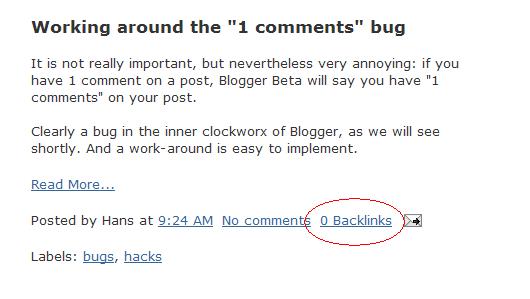
Scroll down to my post called "Working around the 1 comments-bug". In the footer you will see "0 backlinks".
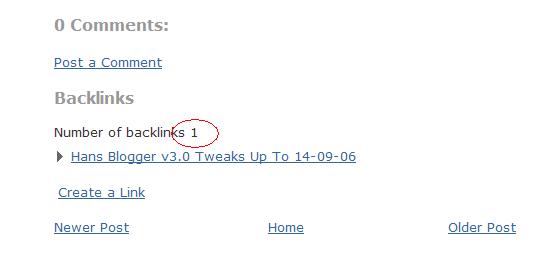
Now open the post itself, and scroll to the bottom. You will see: Number of backlinks 1, followed by the link.
That is very strange, because for both counters the tag <data:post.numBacklinks/> is used. In the first case it gives 0, in the second case 1.
Any ideas out there what's happening here?
Any ideas out there what's happening here?
Sunday, September 17, 2006
Hacks and Bugs

In my last post I showed you my most recent hack to have expandable/collapsable peekaboo-posts, based on the work of Ramani.
I noticed that the Undefined Object Error that devastated my Blog last week, had returned. Luckily, I had saved my old template, and some uploading of templates proved what I suspected: implementing the hack leads to this horrible screendump.
Check it out for yourself, in 3 steps.
Step 1: download and backup your current template.
Step 2: get my template with peekaboo posts, and upload it to your blog.
Check for yourself how nice it works, and how shocking the screendump is when cliking older posts.
Step 3: get my template with normal posts, and upload it to your blog. The Older Posts link will work fine again.
I checked ou several Blogs, and found this bug on the following blogs:
- Hackosphere
- Hoctro (several pages down)
- Phydeaux3
Wednesday, September 13, 2006
Working around the "1 comments" bug
It is not really important, but nevertheless very annoying: if you have 1 comment on a post, Blogger Beta will say you have "1 comments" on your post.
Clearly a bug in the inner clockworx of Blogger, as we will see shortly. And a work-around is easy to implement.
How it works in Beta
Open your template, switch to HTML-editing mode, and look for the code below:
<b:if cond='data:post.allowComments'>
<a class='comment-link' expr:href='data:post.addCommentUrl' expr:onclick='data:post.addCommentOnclick'>
<b:if cond='data:post.numComments == 1'>1 <data:top.commentLabel/>
<b:else/>
<data:post.numComments/> <data:top.commentLabelPlural/>
</b:if>
</a>
</b:if>
Now what is the meaning of all this haberdash?
In plain language it says:
If your post allows comments, then do the following:
If the number of comments is exactly 1, print "1 comment", and if it is not exactly 1, print "X comments".
The number of comments is stored in the Blogger database in the <data:post.numComments/>-field. The text that has to be printed is stored in single ("comment") and in plural ("comments") in the fields <data:top.commentLabel/> and <data:top.commentLabelPlural/>-fields respectively.
This is done so that you can customize this text to any other text you like, such as "silly input" or to another language.
I think this is where Beta shows a bug: clearly both the single and the plural version of the "comment" text are the same.
So what you can do is this:
How to work around the bug.
Below you can see the code for the workaround. Replace the <data:top.commentLabel/> with "Comment".
<b:if cond='data:post.allowComments'>
<a class='comment-link' expr:href='data:post.addCommentUrl' expr:onclick='data:post.addCommentOnclick'>
<b:if cond='data:post.numComments == 1'>1 comment
<b:else/>
<data:post.numComments/> <data:top.commentLabelPlural/>
</b:if>
</a>
</b:if>
Clearly a bug in the inner clockworx of Blogger, as we will see shortly. And a work-around is easy to implement.
How it works in Beta
Open your template, switch to HTML-editing mode, and look for the code below:
<b:if cond='data:post.allowComments'>
<a class='comment-link' expr:href='data:post.addCommentUrl' expr:onclick='data:post.addCommentOnclick'>
<b:if cond='data:post.numComments == 1'>1 <data:top.commentLabel/>
<b:else/>
<data:post.numComments/> <data:top.commentLabelPlural/>
</b:if>
</a>
</b:if>
Now what is the meaning of all this haberdash?
In plain language it says:
If your post allows comments, then do the following:
If the number of comments is exactly 1, print "1 comment", and if it is not exactly 1, print "X comments".
The number of comments is stored in the Blogger database in the <data:post.numComments/>-field. The text that has to be printed is stored in single ("comment") and in plural ("comments") in the fields <data:top.commentLabel/> and <data:top.commentLabelPlural/>-fields respectively.
This is done so that you can customize this text to any other text you like, such as "silly input" or to another language.
I think this is where Beta shows a bug: clearly both the single and the plural version of the "comment" text are the same.
So what you can do is this:
- Wait for Blogger to solve this bug, or
- Implement my hack now!
How to work around the bug.
Below you can see the code for the workaround. Replace the <data:top.commentLabel/> with "Comment".
<b:if cond='data:post.allowComments'>
<a class='comment-link' expr:href='data:post.addCommentUrl' expr:onclick='data:post.addCommentOnclick'>
<b:if cond='data:post.numComments == 1'>1 comment
<b:else/>
<data:post.numComments/> <data:top.commentLabelPlural/>
</b:if>
</a>
</b:if>
Subscribe to:
Posts (Atom)