How do people find your blog? How do they
navigate around it? Which posts are hot, and which are not? That's
interesting to know, and that's why you could start using Google
Analytics, as I do.
Google Analytics is a
free tool, that gives you important and useful feedback on visitor
behavior on your blog. The only thing you have to do is add some
html/javascript code to your blog template, and set up your Google
Analytics account, wait a few days, and watch the data roll in.
Start by setting up an account at Google Analytics.
As a Blogger user you already have a Google account, and you use the
same username and password to set up your Analytics account.
These steps are easy to follow, and will be done in just a few minutes.
Without any further setting-up, this easy setup will provide you already with interesting data. Let me show you some.
This picture shows part of the Google Analytics Desktop.
Top left you see a graph that show the number of
visitors to your blog, the number of page-views, and as a result the
average number of page-views per visitor.
Top-right you can see that
more than 40% of my visitor are regular ones. Bottom-right you can see
where visitors come from. A lot of them seem to find my blog by means of
google, but as you can see about 10% comes from Annie's Blogger University and from Ramani at Hackosphere. And bottom-left you can see where my visitors come from. All over the world, but mostly Europe, Asia and the US of A.
Now let's take a better look at sources and keywords on how people find my blog.
As you can see, google is by far the most important
source for leading people to my blog. Ramani is a very good source to my
blog: you can see that 227 visitors found Beautiful Beta through
Hackosphere. And that number has gone up with 2% since the last period.
The top 5 keywords that are used by people point out that most of them
are looking for templates. This makes me realize that my blog's home
page has no visible link to a templates page. You really have to scroll
down to the labels widget, click 'templates', and then you can view 3
posts that have links to templates. So that is obviously a point to
improve.
What D1 and D2 mean will be dealt with later.
Now let's take a look into the popularity of my content:
As you can see my home page receives the most hits,
which is to be expected. Most popular posts are the Widget Installation
and Downloads page and the new Blogger Beta Template page. So it would
be a good idea to link to these posts from my sidebar. The information
behind these simple screens is vast. Did you know that over 30% from the
people who visited my downloadspage come from USA and Canada?
In a next tutorial I will tell more about defining Destination pages, setting up Conversion Funnels, and measuring Goals.
Thursday, December 7, 2006

All Feeds by Feedburner
Your blog generates feeds, you have these links on your blog pages, but how many people have actually subscribed to your feeds?
Feedburner is used by many of you to monitor those statistics. But thanks to Ramani I recently discovered that there is something like auto-detection, that makes other feedreaders or browsers (like Firefox) automatically detect and subscribe to feeds. Those subscribers are not monitored in the Feedburner-count, so here is a tutorial on how to make all feeds available by Feedburner only. It made my statistics jump from 35 subscribers to 70 in little more than a week.
Open your template in HTML-mode. Close to the top you will find this line of code:
<b:include data='blog' name='all-head-content'/>
This line will not expand to the code behind it, even if you check the Expand Widget Template box. Now view your blog, right-click on it, and from the pop-up menu select "Source" (or the equivalent menu option from your browser). This will bring up a Notepad window, with the HTML-code of the displayed version of your blog. Look carefully at the top lines, and you will see that the widget-code is replaced with:
<meta content='text/html; charset=UTF-8' http-equiv='Content-Type'/>
<meta content='true' name='MSSmartTagsPreventParsing'/>
<meta content='blogger' name='generator'/><link rel="alternate" type="application/atom+xml" title="YourBlogName - Atom" href="http://yourblog.blogspot.com/feeds/posts/default" />
<link rel="alternate" type="application/rss+xml" title="YourBlogName - RSS" href="http://yourblog.blogspot.com/feeds/posts/default?alt=rss" />
<link rel="service.post" type="application/atom+xml" title="YourBlogName - Atom" href="http://www.blogger.com/feeds/yourblogid/posts/default" />
<link rel="EditURI" type="application/rsd+xml" title="RSD" href="http://beta.blogger.com/rsd.g?blogID=yourblogid" />
In this example, YourBlogName stands for the title of your blog, yourblog.blogspot.com is your blog's url, and yourblogid is a long number, the id of your blog. The two lines with link rel="alternate", indicated in red, let newsreaders auto-detect your blogs feeds. So we have to change these lines to point them in the direction of your Feedburner feed. We'll do this in 2 easy steps.
Step 1: Make a backup of your template.
Open your template in HTML-mode, and download the template as a backup.
Step 2: Replace the widget code.
Remove the line:
<b:include data='blog' name='all-head-content'/>
Replace it with:
<meta content='text/html; charset=UTF-8' http-equiv='Content-Type'/>
<meta content='true' name='MSSmartTagsPreventParsing'/>
<meta content='blogger' name='generator'/>
<link href='http://feeds.feedburner.com/yourblogname' rel='alternate' title='RSS' type='application/atom+xml'/>
<link rel="service.post" type="application/atom+xml" title="YourBlogName - Atom" href="http://www.blogger.com/feeds/yourblogid/posts/default" />
<link rel="EditURI" type="application/rsd+xml" title="RSD" href="http://beta.blogger.com/rsd.g?blogID=yourblogid" />
Replace the http://feeds.feedburner.com/yourblogname with the url to your Feedburner feed.
Now save your template.
Now that we have fixed the auto-detection part, there is still the issue of the feed-link on your posts page. This feed-link has to be made invisible, so that your visitor has no other option than following the link to your Feedburner feed.
The standard feedlink provided by Blogger is of class .feed-link.
Open your template in HTML-mode, and inside the skin look for the following line:
.feed-link {
Below this line add:
display: none;
If there is no class .feed-link defined in your template, define it with:
.feed-link { display:none; }
Now save your template.
Congratulations! Your visitors have no escape from Feedburner!
Feedburner is used by many of you to monitor those statistics. But thanks to Ramani I recently discovered that there is something like auto-detection, that makes other feedreaders or browsers (like Firefox) automatically detect and subscribe to feeds. Those subscribers are not monitored in the Feedburner-count, so here is a tutorial on how to make all feeds available by Feedburner only. It made my statistics jump from 35 subscribers to 70 in little more than a week.
Open your template in HTML-mode. Close to the top you will find this line of code:
<b:include data='blog' name='all-head-content'/>
This line will not expand to the code behind it, even if you check the Expand Widget Template box. Now view your blog, right-click on it, and from the pop-up menu select "Source" (or the equivalent menu option from your browser). This will bring up a Notepad window, with the HTML-code of the displayed version of your blog. Look carefully at the top lines, and you will see that the widget-code is replaced with:
<meta content='text/html; charset=UTF-8' http-equiv='Content-Type'/>
<meta content='true' name='MSSmartTagsPreventParsing'/>
<meta content='blogger' name='generator'/><link rel="alternate" type="application/atom+xml" title="YourBlogName - Atom" href="http://yourblog.blogspot.com/feeds/posts/default" />
<link rel="alternate" type="application/rss+xml" title="YourBlogName - RSS" href="http://yourblog.blogspot.com/feeds/posts/default?alt=rss" />
<link rel="service.post" type="application/atom+xml" title="YourBlogName - Atom" href="http://www.blogger.com/feeds/yourblogid/posts/default" />
<link rel="EditURI" type="application/rsd+xml" title="RSD" href="http://beta.blogger.com/rsd.g?blogID=yourblogid" />
In this example, YourBlogName stands for the title of your blog, yourblog.blogspot.com is your blog's url, and yourblogid is a long number, the id of your blog. The two lines with link rel="alternate", indicated in red, let newsreaders auto-detect your blogs feeds. So we have to change these lines to point them in the direction of your Feedburner feed. We'll do this in 2 easy steps.
Step 1: Make a backup of your template.
Open your template in HTML-mode, and download the template as a backup.
Step 2: Replace the widget code.
Remove the line:
<b:include data='blog' name='all-head-content'/>
Replace it with:
<meta content='text/html; charset=UTF-8' http-equiv='Content-Type'/>
<meta content='true' name='MSSmartTagsPreventParsing'/>
<meta content='blogger' name='generator'/>
<link href='http://feeds.feedburner.com/yourblogname' rel='alternate' title='RSS' type='application/atom+xml'/>
<link rel="service.post" type="application/atom+xml" title="YourBlogName - Atom" href="http://www.blogger.com/feeds/yourblogid/posts/default" />
<link rel="EditURI" type="application/rsd+xml" title="RSD" href="http://beta.blogger.com/rsd.g?blogID=yourblogid" />
Replace the http://feeds.feedburner.com/yourblogname with the url to your Feedburner feed.
Now save your template.
Now that we have fixed the auto-detection part, there is still the issue of the feed-link on your posts page. This feed-link has to be made invisible, so that your visitor has no other option than following the link to your Feedburner feed.
The standard feedlink provided by Blogger is of class .feed-link.
Open your template in HTML-mode, and inside the skin look for the following line:
.feed-link {
Below this line add:
display: none;
If there is no class .feed-link defined in your template, define it with:
.feed-link { display:none; }
Now save your template.
Congratulations! Your visitors have no escape from Feedburner!
Friday, December 1, 2006
Recent Posts Widget Updated!
Many users are very thrilled by the
Click-n-Go Recent Posts Widget. And most of them would like to style it
to their own liking. That is why I have added the option to define your
own CSS-styles for the widget.
If you did already install the widget to your blog, and are satisfied with its style, you don't have to change anything. If you want to upgrade it to have CSS, remove the page element, go to the Widget Installation & Downloads Page and re-install the widget.
If you did already install the widget to your blog, and are satisfied with its style, you don't have to change anything. If you want to upgrade it to have CSS, remove the page element, go to the Widget Installation & Downloads Page and re-install the widget.
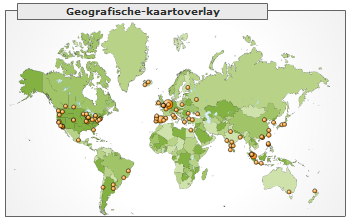
Beautiful Beta spans the globe
Beautiful Beta is now a trusted Blogger
resource worldwide, spanning 34 countries in 5 continents. Visitors come
from places up north, like Akureyri (Iceland) to cities like Melbourne
(Australia), and from Santiago (Chile) in the west to Tokyo (Japan) in
the east.
Welcome, all nations of the world!
Welcome, all nations of the world!
Subscribe to:
Posts (Atom)