Blogger has made a lot of the latest features, including search preferences for meta tag optimization for SEO friendly. However, with standard features of bloggers, not enough to be number one in the Search Engines.
Most Blogger template maker just make a standard meta tag alone, of course, the next task is for the blog owner to better optimize how the blog more successful in the Search Engine. Not quite with a great view, a lot of backlinks, good content and so on.
Below I share the best meta tag for blogger, for the optimization of your blog.
Log into the template editor and find the following code:
<title><data:blog.pageTitle/></title>
Replace with the following code (edit your blog name, keywords, description, etc.)
<!-- Meta Title ErrorPage/404 -->
<b:if cond='data:blog.pageType == "error_page"'>
<title>404: Sorry the page you are looking is not found | blogname</title>
</b:if>
<b:if cond='data:blog.pageType != "item"'>
<!-- Meta Title Search Page -->
<b:if cond='data:blog.searchQuery'>
<title>Keyword search for :: <data:blog.searchQuery/> :: | blogname</title>
</b:if>
<b:if cond='data:blog.pageType == "archive"'>
<!-- Meta Title Archive Page -->
<title>Post Archive by Month <data:blog.pageName/> | blogname</title>
<!-- Meta Description Archive Page -->
<meta expr:content='"Post Archive by Month " + data:blog.pageName + " learn more please visit blogname"' name='description'/>
<b:else/>
<b:if cond='data:blog.pageType == "static_page"'>
<!-- Meta Title Pages -->
<title><data:blog.pageName/> | blogname</title>
<!-- Meta Description Pages -->
<meta expr:content='data:blog.pageName + ". Please read the article " + data:blog.pageName + " learn more please visit blogname"' name='description'/>
<b:else/>
<!-- Meta Title Label Page -->
<b:if cond='data:blog.searchLabel'>
<title>Search for Label :: <data:blog.pageName/> :: | blogname</title>
<!-- Meta Description Label Page -->
<meta expr:content='"Search for category ::" + data:blog.pageName + ":: learn more please visit blogname."' name='description'/>
<b:else/>
<!-- Meta Title Homepage -->
<title><data:blog.pageTitle/></title>
<!-- Meta Description Homepage -->
<meta expr:content='data:blog.pageTitle + " Write your blog description here."' name='description'/>
</b:if>
</b:if>
</b:if>
<!-- Meta Keyword Homepage-->
<meta content='keyword1, keyword2, etc' name='keywords'/>
<b:else/>
<!-- Meta Title Post Page -->
<title><data:blog.pageName/> - blogname</title>
<!-- Meta Description Active Post Page -->
<b:if cond='data:blog.metaDescription'>
<meta expr:content='data:blog.metaDescription' itemprop='description'/>
<b:else/>
<!-- Show if the Meta Description post Page is not active-->
<meta expr:content='data:blog.pageName + ". Please read the article " + data:blog.pageName + " learn more please visit blogname"' name='description'/>
</b:if>
<!-- Meta Keyword Post Page -->
<meta expr:content='data:blog.pageName + ", keyword1, keyword2, dst"' name='keywords'/>
</b:if>
Once you've added the meta tag before, please adjust or replace the meta tags on
Friday, June 14, 2013

Thursday, May 23, 2013
Adding Contact Form Widget For Blogspot
For blogspot users, maybe when you want to add a contact form, you use EmailMeForm, FoxyForm, etc.. Now you do not need to use it again. Because Blogger has now officially released the Contact Form Widget. Although I see myself still no third parties on this widget, but at least with this new widget simplify your job.
Some features of this contact form widget is a notification widget when the user not filling his name, the email is not correct, or empty messages, which is definitely a notification that a message has been sent. Email will be sent to the owner of the blog, via email listed when creating a blog.
For those of you who want to install this widget contact form is very easy. You just add the widget as usual. Then select more gadgets.
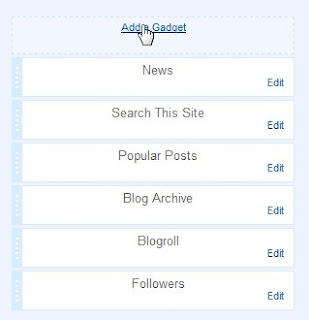
 Now contact form widget appears on your blog. You can put a contact form widget anywhere, either in the sidebar or footer, depending on your taste.
This contact form you can also place it on a static page, for example on page or post. I will explain in the next post. See you.
Some features of this contact form widget is a notification widget when the user not filling his name, the email is not correct, or empty messages, which is definitely a notification that a message has been sent. Email will be sent to the owner of the blog, via email listed when creating a blog.
For those of you who want to install this widget contact form is very easy. You just add the widget as usual. Then select more gadgets.


This contact form you can also place it on a static page, for example on page or post. I will explain in the next post. See you.
Saturday, May 11, 2013
New trick to remove Navbar on Blogspot?
Actually this is an old trick I rewrite. Previously, I have to give a tutorial on removing the navbar, but through the edit css. It is a way to remove blog navbar with the latest methods and also legal. Because this time bloggers provide distinctive features that allow users to remove blog navbar.
How to remove blogspot navbar?
1. Login to your Blogger account 2. Click on the dropdown menu and then select the layout

3. Click edit on navbar widget

4. Once options appear, select Off and then Save

5. Done. Now the blog navbar is hidden
So this is a tutorial on how to remove blogspot navbar. Hopefully this new way of getting easier for us to cultivate our blog
How to remove blogspot navbar?
1. Login to your Blogger account 2. Click on the dropdown menu and then select the layout

3. Click edit on navbar widget

4. Once options appear, select Off and then Save

5. Done. Now the blog navbar is hidden
So this is a tutorial on how to remove blogspot navbar. Hopefully this new way of getting easier for us to cultivate our blog
Friday, May 3, 2013
How to Custom Robots.txt for Blogspot?
Robots.txt serves to prevent web crawlers work with web robots from accessing all or part of a website if it is publicly viewable. Essentially a robots.txt file on a web site will serve as a request that specified robots ignore specified files or directories when crawling a site.
If you use the wordpress.org platform Blog, robots.txt file can create yourself via file manager in cpanel, but if you are blogspot user then there are steps that need to be before activating robots.txt (disabled by default).
1. Login to your Blogger account and go to your blog dashboard
2. Click on Settings >> Search preferences
 3. Edit your Custom robots.txt the choose Yes to enable custom robots.txt content
 4. Then fill with the following command
User-agent: Mediapartners-Google
Allow:/
User-agent: Googlebot
Disallow: /?m=1
Disallow: /?m=0
Disallow: /*?m=1
Disallow: /*?m=0
User-agent: *
Disallow: /search?*
User-agent: Twitterbot
Allow:/
User-agent: *
Disallow: /search
Disallow: /p/*
Disallow: /view/*
Allow: /
Sitemap: http://beautifulbeta.blogspot.com/feeds/post/default?orderby=UPDATED
Note: red letters replace with your own blog
5. Save your jobs
For websites with multiple subdomains, each subdomain must have its own robots.txt file. If example.com had a robots.txt file but sub.example.com not, the rule which would apply for example.com would not apply to a.example.com
If you use the wordpress.org platform Blog, robots.txt file can create yourself via file manager in cpanel, but if you are blogspot user then there are steps that need to be before activating robots.txt (disabled by default).
1. Login to your Blogger account and go to your blog dashboard
2. Click on Settings >> Search preferences


User-agent: Mediapartners-Google
Allow:/
User-agent: Googlebot
Disallow: /?m=1
Disallow: /?m=0
Disallow: /*?m=1
Disallow: /*?m=0
User-agent: *
Disallow: /search?*
User-agent: Twitterbot
Allow:/
User-agent: *
Disallow: /search
Disallow: /p/*
Disallow: /view/*
Allow: /
Sitemap: http://beautifulbeta.blogspot.com/feeds/post/default?orderby=UPDATED
Note: red letters replace with your own blog
5. Save your jobs
For websites with multiple subdomains, each subdomain must have its own robots.txt file. If example.com had a robots.txt file but sub.example.com not, the rule which would apply for example.com would not apply to a.example.com
Subscribe to:
Posts (Atom)